TDIing out loud, ok SDIing as well

Ramblings on the paradigm-shift that is TDI.

Monday, October 1, 2012

Call a stored procedures that perform an update

Got this nifty bit of script from Janne Lahteenmaki for calling a stored procedure that performs an update, and since Janne has been sent his Metamerge pen for community contribution, it's only proper that the community receives the tribute.

In this example there is a JDBC Connector in the AL named 'connDB2':

var command = "{call LLP.FOOBARPROC (?,?,?)}";
var rs = null;
var cstmt = null;
// wrapping it all in a try-catch in case something goes awry
try {
   // Stored procedure call
   // Get open connection from JDBC Connector
   con = connDB2.getConnector().getConnection();
   // Prepare the statement
   cstmt = con.prepareCall(command);
   // Assign IN parameters (use positional placement)
   cstmt.registerOutParameter (2, java.sql.Types.INTEGER);
   cstmt.registerOutParameter (3, java.sql.Types.INTEGER);
   cstmt.setString(1, "1");
   // Make the call
   cstmt.execute();
   // Get results
   var out1 = cstmt.getInt(2);
   var out2 = cstmt.getInt(3);
   // Print them out
   task.logmsg("out1="+out1);
   task.logmsg("out2="+out2);
}
catch(e) { // oh oh - something bad happened
   task.logmsg("EXCEPTION"+e);
   var out1 = cstmt.getInt(2);
   var out2 = cstmt.getInt(3);
   task.logmsg("out1="+out1);
   task.logmsg("out2="+out2);    
}

His stored procedure looks like this:

CREATE PROCEDURE foobarproc (
   IN ikayttajatun    CHAR(8),
   -- output arvot
   OUT out_pk1 INTEGER,
   OUT out_pk2 INTEGER
)
P1: BEGIN
   -- Declare cursor
   --               ################################################################
   -- # Replace the SQL statement with your statement.
   -- #  Note: Be sure to end statements correctly (usually ';')
   -- #
   -- # The example SQL statement SELECT NAME FROM SYSIBM.SYSTABLES
   -- # returns all names from SYSIBM.SYSTABLES.
   -- ######################################################################
   -- paluukoodit
INSERT INTO TFB (ID) VALUES (ikayttajatun);
   SET out_pk1 = 0;
   SET out_pk2 = 0;

END P1

Thanks, Janne, for sharing!

Saturday, September 22, 2012

A View to an NSF

Let's say you have a Notes Document with a lot of fields, including some fat ones - like rich text, images and other wads of data. Even if you are only interested in a subset of the fields, iterating can be agonizingly slow since the TDI Notes Connector retrieves the entire Document for each Entry returned. However, if there is a View available that contains the fields you need then there is a way around this that Rick Chapman and I discovered.

Start with your Notes Connector in Iterator mode, configured so that it is ready to pull Documents from your nsf. Then you add some Hook script magic to do the following:
  1. As part of Connector initialization (or just after), use the open Domino database to get access to your View; For example, in the Prolog - After Initialize Hook of your Notes Iterator. Here you retrieve the View Entries and the list of columns (fields) in the view.
  2. Instead of letting the Notes Connector retrieve Documents via its own getNext() functionality, you implement your own Entry retrieval logic by coding the Override GetNext Hook. This script grabs the next View entry and puts the columns in the Work Entry as attributes.
Here is some sample script for these Hooks to get you going. Remember to replace stuff like viewName with your own values.

Prolog - After Initialize:                                                                           
// first get the Connector Interface (Notes Connector) in a handy variable
 var dom = thisConnector.getConnector()

// This gets a reference to the db using the 'Database' param of the Connector
var db = dom.getDominoDatabase(dom.getParam("Database"))

// Note that any \ in the View name must be changed to /
// Some notes about the View-related objects and methods
//   views = db.getViews() returns all views for db
//   views.length returns the number of views
//   viewEntry.getColumnValues() gives you all the column values for this View entry
//   view.getColumns() returns the column names
var viewName = "98. Admin/DB2 Engagement Form Sync"
var view = db.getView(viewName);

// Prepare our entry counter. The first time around in the Override GetNext Hook we
// will return the first entry of the View, and on subsequent cycles we'll grab the next entry.
var counter = 0

// Retrieve the view entries
var col = view.getAllEntries()

// Get the column names
var colname_vec=view.getColumnNames()

Override GetNext:                                                                                      
if (counter == 0) {
    viewEntry = col.getFirstEntry()
} else {
    viewEntry = col.getNextEntry()
}

// check for End Of Data (EOD)
if (myEntry == null) { 
    result.setStatus(0) // signals EOD
    return // exit the Hook and end Iteration
} else {
    result.setStatus(1) // this means there is still data available
}

counter++ // must remember to increment our entry count

// Display a read status message for every 200 entries
if (counter % 200 == 0 ) {
    task.logmsg(thisConnector.getName() + " entry count: " + counter)
}

// Return all column values
vec = viewEntry.getColumnValues()

// Overriding GetNext means no Input Map, so the column fields must be put in the Work Entry here
for (i = 0; i < vec.length; i++) {
    work[colname_vec.elementAt(i)]= vec.elementAt(i)
}


And that's all there is to it! And note, gentle reader, that I have not tested this code - simply copy/pasted it from a project I assisted with. So if you find any problems here then please let me know and I will rectify this post :) Thanks!!

Monday, February 13, 2012

Certificate chain chain chaining error

You're trying to connect to an https server but get an SSL handshake exception. The error message tells you that the certificate you received from the secure server is not trusted. What does this mean, and what do you do about it?

This exception means that the cert you got from the server is not in your TDI truststore - the one referenced by the javax.net.ssl.truststore property - or it is signed by another certificate that is not found there. To fix this issue you have to get necessary public key certificate and import it into your truststore.

So how do you get hold of this cert? If you know the admin(s) for the server then you can request it from them. Another approach is to connect and blindly assume that the certificate recieved is trusted. Some browsers allow you to save the cert to file. You can also use the Java utility provided in this article.

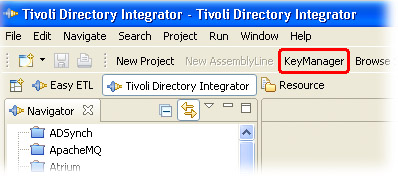
Once you have the certificate file you import it into your truststore either by using the commandline utility, keytool, found in the jvm/jre/bin folder of your TDI installation, or by using the iKeyMan application linked in button bar at the top of the TDI Configuration Editor (CE).


If you haven't changed the default security setup then the truststore will be the testadmin.jks file found in the serverapi folder of your Solution Directory. The default password is 'administrator'.

Once the certificate is imported, the SSL connection will work.

And, as always, thanks to Jens Thomassen for his invaluable insight and guidance!


Monday, November 21, 2011

Early Christmas Stocking Stuffers

Since this past summer, TDI 7.1 Fixpacks now include a number of new components. However, since they are dropped in the examples folder during fixpack updating and not under jars, they won't show up in the Add Component wizard until you make them available to your TDI installation. This can be done in a couple of ways, as I have outlined here.

To whet your appetite, here is a list of powerful new components provided under examples:
  • TPAE IF Connectors include a 'Simple' version which is comparable to the 'Generic Maximo Connector', although it has been extended to work with a broader range of MBOs. The other TPAE IF Connector (without 'Simple' in its name) further enhances integration capabilities to Maximo application data.
  • TPAE IF Change Detection Connector allows you to hook into change notifications coming from the Maximo integration framework, for catching and propagating new and modified data to any number of targets. And deletes.
  • File Management Connector is for reading and modifying file system structures and file system metadata. More specifically, it can create, find and delete files and directories. You still use the 'File System' Connector to work with file contents, but now you could iterate through a directory and load each returned filepath into a File System Connector (for example, in a Connector Loop) to process the file.
  • File Transfer Function component allows you to securely copy files between any two systems, either to or from a remote system, or between two remote systems.
  • JSON Parser allows you to read serialized JSON into the hierarchical Entry-Attribute-value model of TDI where you can use features like XPath searches and 'DOM tree walking' techniques to access and manipulate parsed objects. And of course to turn an hierarchical Entry into a JSON stream. Makes going from JSON to XML, and vice versa, a snap :)
Of course there are more components available under examples, like the RegExp Parser and Exchange Change Detection Connector, ready for eager hands to explore and put to good work. Each example folder also includes documentation on that component, as well as example Configs that can be imported into TDI and used to jump start their usage and understanding.

Saturday, November 12, 2011

Getting TDI installed on Ubuntu

Courtesy of TDI champion and support guru, Jason Williams: Adventures with IBM TDI

Monday, August 1, 2011

work.FullName.toUpperCase() - What's wrong with this picture?

The fact that TDI lets you use '.' to reference attributes (work.FullName) coupled with JavaScript engine's (limited) automatic type conversion are a constant source of confusion. Although I feel a long rant coming on, I will resist and save some content on this subject for future blogs. For now, suffice to say that using dot notation to reference an attribute gets you just that: a com.ibm.di.entry.Attribute.

Quick refresher alert: Attributes are named containers of values. So for example, work.mail is a container named 'mail' that can in turn hold zero or more values. The values themselves can be any kind of Java object: String, Date, java.sql.Blob - even another attribute, as is the case when working with hierarchical data in TDI (for example, parsing xml, rdf, json, ...).

The JS Engine in TDI sometimes converts the attribute being referenced to a string representation of its value, as with this snippet:

"My name is " + work.FullName >> My name is Slim Shady

Since the Attribute is part of a String concatenation, TDI's JSEngine conveniently returns its value as a Java String instead of the attribute itself. But that's about as far as auto-conversion goes. In most cases when you send an Attribute to do a String's job, the Attribute's toString() method is used. This results in a string value that starts with the attribute name, then a colon and its value.

work.FullName >> "FullName": "Slim Shady"

The toString() method for both the Entry and Attribute classes give you this JSON-like result (of course, you use the JSON Parser for real JSON) and this may not be what you want.

Even worse is when you start calling String functions directly from your dot-referenced Attribute:
work.FullName.toUpperCase() >> com.ibm.jscript.InterpretException: Script interpreter error, line=1, col=12: Error calling method 'toUpperCase()' on an object of type 'com.ibm.di.entry.Attribute'

So what's a poor TDI'er to do? As usual, there is more than one way to flay this feline:

work.getString("FullName").toUpperCase() >> SLIM SHADY
work.FullName.getValue().toUpperCase() >> SLIM SHADY
work["FullName"].getValue().toUpperCase() >> SLIM SHADY
(work.FullName + "").toUpperCase() >> SLIM SHADY

The clue here is to reference the value of the attribute, not the attribute itself. Sometimes you'll want a String representation and will use methods like entry.getString(attributeName) or attribute.getValue(). In those situations where you need the actual Java class used to store the value then you use attribute.getValue(index), where index is is an integer value denoting which value you want: from zero to attribute.size() - 1.

For the sake of completeness, note that calling entry.getObject(attributeName) will return the Java object used to store the first value of the named attribute.

And if any of this is still unclear, please drop a note in the forum and I'll will strive to clarify without further pontification :)

Forum: https://groups.google.com/forum/#!forum/ibm.software.network.directory-integrator